
As mentioned in the introduction, a special-case version of plotc, called plotc_p3d, may also be used. plotc_p3d can be used to create two-dimensional line plots from the xyz and q files created by many CFD codes for use with the three-dimensional plotting program Plot3d [Plot3d is a plotting package written at NASA Ames Research Center, and is used primarily for displaying results from computational fluid dynamics codes. [Walatka, P. P., Buning, P. G., Pierce, L., and Elson, P. A. (1990) "PLOT3D User's Manual," NASA TM 101067.] Plots may be created showing the variation of a function along any of the grid lines in the three-dimensional flow field. This appendix includes some general information about plotc_p3d, an example showing how to run it, and the man page for the shell script used to run the code.
plotc_p3d is, basically, simply plotc with a specialized COORS routine. Since, except for the COORS routine, the plotc_p3d code is the same as the plotc code, namelists PTYPE and AXES described previously for plotc also apply to plotc_p3d. A third namelist, P3D, is used to specify the function to be plotted and the grid line or lines of interest. The standard COORS input, of course, is not used. However, sets of symbols may be plotted using the standard POINTS input, just as in plotc.
The type of Plot3d xyz and q files (i.e., whole, planes, or 2-D; unformatted, binary, or formatted; and with or without IBLANK'ing) is specified via command-line options. [Currently, xyz files with IBLANK'ing may be read, but the IBLANK array is ignored.] The files may be single-block, or multi-block with at most 20 blocks. The number of grid points per block is limited to 400,000. The grid lines of interest (i.e., those along which the function being plotted is varying) must all be in the same block.
This namelist is used to specify the desired function,
and to identify the grid line or lines along which the function
will be plotted.
| IFCT | An integer specifying the function to be plotted.
The functions currently available are:
The definitions of all these functions are presented in the Section Function Definitions. Note that for turbulent flow, functions 100-107 and 120-128 require a turbulence data file, in addition to the usual xyz and q files. The format of the Plot3d xyz and q files is described by Walatka, et. al. [Walatka, P. P., Buning, P. G., Pierce, L., and Elson, P. A. (1990) "PLOT3D User's Manual," NASA TM 101067.] The format of the turbulence data file is described in the Section Function Definitions. The default value for IFCT is 13, corresponding to the ξ-velocity. | |||||||||||||||||||||||||||||||||||||||||||||||||||||||||||||||||||||||||||||||||||||||||||||||||||||||||||||||||||||||||||||||||||||||||||||||||||||||||||||||
| IABSC | An integer specifying the abscissa for the plot.
Note that the IABSC = −n capability allows
you to plot any supported function against any other supported
function.
For 3-D cases, the valid values are:
For 2-D cases, of course, 3 is an invalid value, as are negative values related to the z direction. The default value is 5, corresponding to the distance along the specified grid line. | |||||||||||||||||||||||||||||||||||||||||||||||||||||||||||||||||||||||||||||||||||||||||||||||||||||||||||||||||||||||||||||||||||||||||||||||||||||||||||||||
| IDIR | An integer specifying the computational coordinate direction of the
grid line(s) of interest.
For 3-D cases, the valid values are:
For 2-D cases, of course, 3 is an invalid value. The default value is 1, corresponding to the ξ direction. | |||||||||||||||||||||||||||||||||||||||||||||||||||||||||||||||||||||||||||||||||||||||||||||||||||||||||||||||||||||||||||||||||||||||||||||||||||||||||||||||
| IND | An array of up to 100 integers specifying exactly which grid line(s) in
direction IDIR are of interest.
For 3-D cases, each pair of values represents a separate curve in the plot. If IDIR = 1, corresponding to grid lines in the ξ direction, the first pair of values specifies the η and ζ indices of the first grid line of interest, the second pair specifies the η and ζ indices of the second grid line of interest, etc. Similarly, if IDIR = 2, corresponding to grid lines in the η direction, these values specify the ξ and ζ indices. And if IDIR = 3, corresponding to grid lines in the ζ direction, these values specify the ξ and η indices. For 3-D cases the default for the first pair of values is 1,1, and the default for the remaining values is 0. For 2-D cases, each value represents a separate curve in the plot. If IDIR = 1, corresponding to grid lines in the ξ direction, the first value specifies the η index of the first grid line of interest, the second value specifies the η index of the second grid line of interest, etc. Similarly, if IDIR = 2, corresponding to grid lines in the η direction, these values specify the ξ indices. For 2-D cases the default for the first value is 1, and the default for the remaining values is 0. | |||||||||||||||||||||||||||||||||||||||||||||||||||||||||||||||||||||||||||||||||||||||||||||||||||||||||||||||||||||||||||||||||||||||||||||||||||||||||||||||
| INEAR | An integer specifying the location of the solid wall for plots of
y+ or u+.
This parameter is only needed if IFCT = 108 or
109, or if IABSC = −108 or −109.
For 3-D cases, the valid values are:
For 2-D cases, of course, 5 and 6 are invalid values. The default value is 3, corresponding to a wall at η = 0. | |||||||||||||||||||||||||||||||||||||||||||||||||||||||||||||||||||||||||||||||||||||||||||||||||||||||||||||||||||||||||||||||||||||||||||||||||||||||||||||||
| IBLOCK | The block number for multi-block xyz and q files. The default value is 0, indicating that the xyz and q files are in single-block form. |
This section describes how the various functions that may be plotted are computed from information in the xyz and q files. For turbulent flow, functions 100-107 and 120-128 also require a turbulence data file. The equations in this section are written for 3-D flow. Those for 2-D flow are similar.
The xyz file contains the Cartesian coordinates x, y, and z at each grid point. The q file contains the static density q1, the momentum components q2 through q4, and the total energy per unit volume q5. In the xyz and q files, lengths are non-dimensionalized by the reference length Lr, density by the reference density ρr, velocity by the reference speed of sound ar, and total energy per unit volume by ρr ar2. The q file also contains the reference Mach number Mr = ur / ar and the reference Reynolds number Rer = ρr ar Lr / μr, where ur and μr are the reference velocity and the reference viscosity. The format of the xyz and q files is described by Walatka, et. al. [Walatka, P. P., Buning, P. G., Pierce, L., and Elson, P. A. (1990) "PLOT3D User's Manual," NASA TM 101067.]
The turbulence data file contains the turbulent viscosity coefficient μt, the turbulent kinetic energy k, and the turbulent dissipation rate ε. These three parameters are non-dimensionalized by μr, ur2, and ρr ur4 / μr, respectively. This file also contains a "reference" Prandtl number defined as Prr = μr ur2 / kr Tr, where kr is the reference thermal conductivity.
In the following equations, all parameters are non-dimensional, except for those with an overbar and reference conditions like ρr, etc. The parameter γr is assumed to be 1.4.
The velocities in the Cartesian coordinate directions are defined as

The Mach number is then simply
The contravariant velocities (i.e., velocities normal to constant ξ,
η, and ζ surfaces) are given by
The velocities in the ξ, η, and ζ directions are
The flow angles are in degrees, and are defined by
As noted in the previous section, the static density is simply

The static and total pressures are defined as


The static pressure coefficient is defined as


For M ≤ 1 the pitot pressure pp = pT.
For M > 1 the pitot pressure is

The dynamic pressure is defined as

The static and total temperatures are defined as

The total energy per unit volume is
The internal energy is defined as
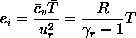
The kinetic energy is defined as
The static enthalpy is defined as
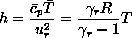

The vorticity components in the x, y, and z directions
are defined as
The total vorticity magnitude is simply
The laminar viscosity coefficient is computed from the following formula,
which is valid for air at temperatures from about 400 to 3400 °R
[White, F. M. (1974) Viscous Fluid Flow, McGraw-Hill Book Company,
New York]:
The laminar thermal conductivity coefficient is computed from the
following formula, which is valid for air at temperatures from about
375 to 1800 °R
[White, F. M. (1974) Viscous Fluid Flow, McGraw-Hill Book Company,
New York]:

Functions 100-107 require a turbulence data file, in addition to the usual xyz and q files. This file contains the turbulent viscosity coefficient μt, the turbulent kinetic energy k, and the turbulent dissipation rate ε. The second coefficient of turbulent viscosity λt = −2μt / 3.
The turbulent thermal conductivity coefficient is defined as

The effective viscosity coefficient, second coefficient of viscosity,
and thermal conductivity coefficient are simply
Computing the inner region variables y+ and
u+ requires knowledge of the wall location.
Since this information is not in the xyz, q, or turbulence data
files, the user must supply it in namelist P3D when these parameters
are being plotted.
The inner region velocity is defined as

The inner region coordinate is defined as
For turbulent flow, functions 120-128 require a turbulence data file,
in addition to the usual xyz and q files.
The shear stresses and heat fluxes are defined as
The Cartesian coordinates x, y, and z are obtained directly from the xyz file.
The Jacobian of the generalized nonorthogonal grid transformation is
defined as J = 1/J −1, where
For turbulent flow, functions 100-107 and 120-128 require a turbulence data file, in addition to the Plot3d xyz and q files. This file is analogous to the q file in format. Like the q file, it may be whole, planes, or 2-D, and unformatted, binary, or formatted. It may also be single- or multi-block.
The following code fragments show how this file may be written, in unformatted or binary form, using Fortran write statements. A formatted file may be written by replacing (iunit) with (iunit,*)
The Fortran variable nblock is the number of grid blocks;
idim, jdim, and kdim are the grid sizes in the
ξ, η, and ζ directions for each block;
machr is the reference Mach number Mr;
prr is the ``reference'' Prandtl number Prr = μr ur2 / kr Tr;
rer is the reference Reynolds number Rer = ρr ar Lr / μr;
time is an unused parameter;
and mut, ke, and eps are the turbulent viscosity
μt, the turbulent kinetic energy k, and the turbulent dissipation
rate ε.
Single-block, 2-D
   write (iunit) idim,jdim
   write (iunit) machr,prr,rer,time
   write (iunit) ((mut(i,j),i=1,idim),j=1,jdim), &
                 ((ke (i,j),i=1,idim),j=1,jdim), &
                 ((eps(i,j),i=1,idim),j=1,jdim)
Single-block, 3-D, whole
   write (iunit) idim,jdim,kdim
   write (iunit) machr,prr,rer,time
   write (iunit) (((mut(i,j,k),i=1,idim),j=1,jdim),k=1,kdim), &
                 (((ke (i,j,k),i=1,idim),j=1,jdim),k=1,kdim), &
                 (((eps(i,j,k),i=1,idim),j=1,jdim),k=1,kdim)
Single-block, 3-D, planes
   write (iunit) idim,jdim,kdim
   write (iunit) machr,prr,rer,time
   do k = 1,kdim
      write (iunit) ((mut(i,j),i=1,idim),j=1,jdim), &
                    ((ke (i,j),i=1,idim),j=1,jdim), &
                    ((eps(i,j),i=1,idim),j=1,jdim)
   end do
Multi-block, 2-D
   write (iunit) nblock
   write (iunit) (idim(ibl),jdim(ibl),ibl=1,nblock)
   do ibl = 1,nblock
      write (iunit) machr,prr,rer,time
      write (iunit) ((mut(i,j),i=1,idim(ibl)),j=1,jdim(ibl)), &
                    ((ke (i,j),i=1,idim(ibl)),j=1,jdim(ibl)), &
                    ((eps(i,j),i=1,idim(ibl)),j=1,jdim(ibl))
   end do
Multi-block, 3-D, whole
   write (iunit) nblock
   write (iunit) (idim(ibl),jdim(ibl),kdim(ibl),ibl=1,nblock)
   do ibl = 1,nblock
      write (iunit) machr,prr,rer,time
      write (iunit) (((mut(i,j,k),i=1,idim(ibl)),j=1,jdim(ibl)),k=1,kdim(ibl)), &
                    (((ke (i,j,k),i=1,idim(ibl)),j=1,jdim(ibl)),k=1,kdim(ibl)), &
                    (((eps(i,j,k),i=1,idim(ibl)),j=1,jdim(ibl)),k=1,kdim(ibl))
   end do
Multi-block, 3-D, planes
   write (iunit) nblock
   write (iunit) (idim(ibl),jdim(ibl),kdim(ibl),ibl=1,nblock)
   do ibl = 1,nblock
      write (iunit) machr,prr,rer,time
      do k = 1,kdim(ibl)
         write (iunit) ((mut(i,j,k),i=1,idim(ibl)),j=1,jdim(ibl)), &
                       ((ke (i,j,k),i=1,idim(ibl)),j=1,jdim(ibl)), &
                       ((eps(i,j,k),i=1,idim(ibl)),j=1,jdim(ibl))
      end do
   end do
plotc_p3d was used to generate a plot comparing the computed and experimental static pressure distribution along the upper and lower surfaces of a two-dimensional transonic diffuser. The calculations were done using Proteus, an unsteady 2-D/axisymmetric Navier-Stokes computer code. [Towne, C. E., Schwab, J. R., and Bui, T. T. (1993) "Proteus Two-Dimensional Navier-Stokes Computer Code - Version 2.0, Volumes 1-3," NASA TM's 106336, 106338, 106339.] The experimental data were taken by Hsieh et. al. [Hsieh, T., Wardlaw, A. B., Jr., Collins, P., and Coakley, T. J. (1987) "Numerical Investigation of Unsteady Inlet Flow Fields," AIAA Journal, Vol. 25, No. 1, pp. 75-81]
The Plot3d code, of course, was designed for 3-D problems. The unsteady 2-D Proteus code writes results into the Plot3d files with time stored in the z slot in the xyz file. This particular problem was a steady flow problem. Therefore only one time level, with the final solution, was written into the file.
The namelist input file was called sajben.plotin, and is listed below. Note that the coordinates of the points to be plotted as symbols, representing the experimental data, are read in using the default POINTS routine. These data are thus included in the namelist input file, as described in the section POINTS Input.
Note also that NCURV = −1 even though we want to plot 2 curves, showing the computed static pressure along the upper and lower surfaces of the diffuser. plotc_p3d will automatically determine the number of curves based on the input in namelist P3D. Therefore, only the sign on NCURV is significant. [This is only true if the input parameter OFFSET = 0.0. If OFFSET > 0.0, the number of curves to be plotted must be specified.] As described under namelist PTYPE, the sign determines whether each curve is to be plotted using a solid line, or using different line types.
 &ptype
  ncurv=-1, nsymb=-2,                      Use different line types for curves,
                                              and plot two sets of symbols.
  isize1=5,                                Size of symbols.
  ititle(1)=1,                             Include plot title.
  isizet=11, isizel=10,                    Size of characters in titles and labels.
  ilegnd=1, xleg=3.0, yleg=0.6,            Add a legend.
  isizeg=8,                                Size of characters in legend.
  ilegbx=-1,                               Put box around legend.
  aleg(1,2)='Bottom Wall - Proteus',       Legend contents, column 2.
            'Top Wall - Proteus',
            'Bottom Wall - Experiment',
            'Top Wall - Experiment',
 &end
 &axes
  iscale=1,                                Specify scales for both axes.
  xmin=-5., xmax=10., nintx=6, xlen=5.,    x-axis information.
  ymin=.3,  ymax=1.,  ninty=7, ylen=3.125, y-axis information.
  iframe=2,                                Draw frame around plot.
  ptitle='Transonic Diffuser Flow',        Title for top of plot.
 &end
 &p3d
  ifct=30,                                 Plot static pressure,
  iabsc=1,                                 vs. the x coordinate,
  idir=1,                                  along lines in the ξ direction,
  ind=1,1,51,1,                            with these η and ζ indices.
 &end
    38                                     Experimental values, lower surface.
   -4.0101   -3.3134   -2.4344   -1.9845   -1.6942   -0.9468   -0.6368   -0.5023
   -0.3008   -0.0504    0.0203    0.1383    0.3682    0.5759    0.7057    0.9142
    1.0316    1.1592    1.2952    1.4388    1.5355    1.5497    1.7481    1.7434
    2.0053    2.2696    2.4902    2.8756    3.3169    3.9725    4.4024    5.0671
    5.8317    6.3346    6.9666    7.4592    8.0546    8.6307
    0.8617    0.8621    0.8467    0.8218    0.7887    0.6771    0.6496    0.5823
    0.5685    0.5670    0.5496    0.5369    0.5259    0.4977    0.4965    0.4721
    0.4565    0.4448    0.4292    0.4939    0.5118    0.5797    0.5955    0.6175
    0.6265    0.6470    0.6799    0.7020    0.7250    0.7512    0.7637    0.7890
    0.8035    0.8100    0.8125    0.8142    0.8187    0.8202
    38                                     Experimental values, upper surface.
   -3.9303   -3.2281   -2.6103   -1.8224   -1.5536   -0.8820   -0.6452   -0.3465
   -0.1869    0.0125    0.2211    0.3900    0.5292    0.6399    0.7798    0.9111
    1.0512    1.2204    1.4180    1.5493    1.5157    1.7092    1.7050    1.9448
    2.1293    2.3701    2.6292    3.0134    3.4348    4.1133    4.5805    5.2556
    6.0164    6.5299    7.1564    7.6785    8.2383    8.8267
    0.8646    0.8646    0.8722    0.8740    0.8260    0.6671    0.5929    0.5552
    0.5428    0.5435    0.5423    0.5280    0.5045    0.4800    0.4621    0.4507
    0.4337    0.4213    0.4089    0.3975    0.5013    0.5291    0.5684    0.5877
    0.6193    0.6461    0.6672    0.7023    0.7307    0.7663    0.7825    0.7928
    0.8049    0.8127    0.8147    0.8159    0.8152    0.8153
A terminal session using the above namelist input file is shown below. The first line, in slanted type, is entered by the user. The xyz and q files are in whole binary form, and this information is specified via the -r and -f options on the plotc_p3d command line. The command plotc_p3d is the shell script used to run the plotting program plotc_p3d. This example assumes the Plot3d xyz and q files are named sajben.px and sajben.pq, respectively.
plotc_p3d -r w -f b sajben.px sajben.pq sajben.plotin
Using plot3d xyz file sajben.px
Using plot3d q file sajben.pq
Using namelist input file sajben.plotin
 Reading xyz and q files

PostScript output is in plotc_p3d.ps
As with plotc, the plot will appear in a window on the graphics
monitor, drawn using OpenGL routines.
The PostScript version of the plot will be stored in a file
called plotc_p3d.ps in your current directory.
Subsequent runs using plotc_p3d will overwrite this file, so
change the file name if you want to keep it around.
Or, alternatively, you can specify a name for this file from the
command line with the -o option, as described in the
plotc_p3d man page.
The PostScript plot is shown below.

The following man page describes how to use the shell script
plotc_p3d.
NAME
| plotc_p3d - a 2-D plotting program for Plot3d xyz and q files |
| plotc_p3d [-b input9] [-o outps] [-g outdb] [-t tfile] [-f u|b|f] [-r w|p|2] [-i] [-V] xyzfile qfile namelist |
| plotc_p3d is a Bourne shell script used to run the plotting program plotc_p3d.ex. This program can be used to create two-dimensional line plots from the xyz and q files created by many CFD codes for the three-dimensional Plot3d plotting program. Plots may be created showing the variation of various functions along specified grid lines in the three-dimensional mesh. The names of the xyz and q files are given by the arguments xyzfile and qfile, respectively. The namelist input to plotc_p3d.ex must be supplied in the file namelist, and is described in detail in the Plotc User's Manual. |
| -b | Links the file input9 to fort.9.
This is the file used for the coordinates of the symbol sets being
plotted when IFILEP = 1.
| ||
| -o | Use outps as the name of the output PostScript file.
The default is plotc_p3d.ps.
| ||
| -g | Use outdb as the name of the output debug file.
The default is plotc_p3d.debug.
| ||
| -t | In addition to the xyz and q files, read the turbulence data file
tfile.
| ||
| -f | Specifies the file format for the xyz, q, and turbulence data files.
The options are u, b, or f, corresponding to
unformatted, binary, and formatted, respectively.
The default is b.
| ||
| -r | Specifies the record format for the xyz, q, and turbulence data files.
The options are w, p, or 2, corresponding to
3-D whole format, 3-D planes format, and 2-D format, respectively.
The default is w.
| ||
| -i | If specified, the xyz file includes the integer IBLANK array.
The default is an xyz file without the IBLANK array.
| ||
| -V | Print the current version number and usage information for plotc_p3d, and immediately exit. |
| plotc_p3d.ex is simply a specialized version of plotc.ex,
a general-purpose two-dimensional plotting program, with a COORS
routine that reads the Plot3d xyz and q files and computes
coordinates for various two-dimensional line plots.
Please contact Charlie Towne (towne@nasa.gov) to report bugs and/or to suggest improvements. |
| The -i option allows xyz files with IBLANK'ing to be read,
but currently the IBLANK array is ignored.
The input parameter FONTS, which allows the user to specify the font to be used for plot titles, labels, legend, and text strings, is supported only for the PostScript plot. The input parameters ISIZEL, ISIZET, ISIZEG, and ISIZES, which allow the user to specify the size of characters in the labels, titles, legend, and strings, are supported only for the PostScript plot. Probably others yet to be discovered. |
| plotc_p3d accesses or creates the following files: |
| plotc_p3d.ex | Executable for plotc_p3d.
| ||
| plotc_p3d.debug | Debug output file, symbolically linked to fort.30.
| ||
| plotc_p3d.ps | PostScript output file, symbolically linked to fort.31.
| ||
| plotc.psprolog | Prolog used in PostScript output file. |
| Plotc User's Manual. | |
| PLOT3D User's Manual, NASA TM 101067. |
| Charlie Towne |
Last updated 2 Nov 2005