|
|
|
|
|
|
Grade Level: 9-12
National Standards:
Objectives:
After reading the explanation given below, use FoilSim to complete the activity to design an airplane wing that generates a given lift.
FoilSim is an interactive simulation software package that determines the airflow around various shapes of airfoils. As you change the parameters of airspeed, altitude, angle of attack, thickness and curvature of the airfoil, and size of the wing area, the software calculates the lift. The package was created at NASA Glenn Research Center to illustrate an example of their research.
Macintosh or MS-Windows 3.x, 95, or NT versions of FoilSim are available for downloading off the World Wide Web at FoilSim Download.
Shown below is a screen shot from the program showing the controls and displays. You may change the values of the variables by using the slider or the input box on the left of the slider.
To use the slider:
To use the input box:
Simply select the value in the input box, key in the new value, and press Enter or Tab when finished. The button on the slider will move corresponding to the value typed in the box.
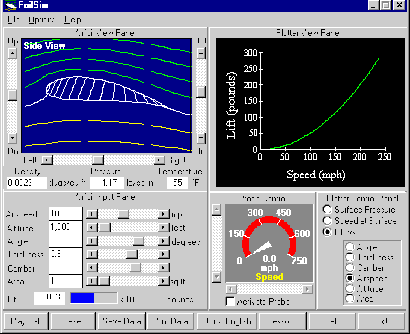
To begin the problem, click on Design of Airfoil for Given Lift Activity.
Assessment:
You, or you and your partner(s), will be evaluated on the feasibility of your answers.
Evaluation:
You will be able to use FoilSim to complete the activity to design an airplane wing that generates a given lift.
Submitted by: Beth Lewandowski, NASA Glenn Research Center, Cleveland, Ohio
 |
 |
 |
 |