|
out of Calculus Part I: Activity |
|
|
|
out of Calculus Part I: Activity |
|
|
|
If so instructed by your teacher, print out a worksheet page for these problems. |
|
Background:
|
|
|
Procedure: |
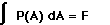
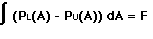
Using FoilSim, set the control panel as shown in Figure 1. 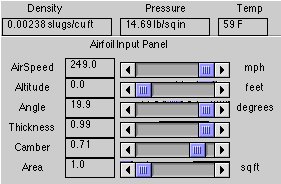 Figure 1 Use command-shift-3 (on a Macintosh) or use the "print screen" or "prtscr" button (on Windows) to screen-capture the page. Paste the graph in a word processing or paint document. Crop the picture so that just the graph remains as shown in Figure 2. Use the printing options to enlarge and print the graph. 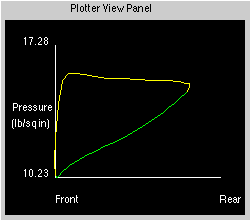 Figure 2 Be careful with scaling. Since the "Area" setting in the FoilSim control panel was set at 1 sq.ft., the curves displayed (not the axis) will be from "0" to "1." Draw narrow rectangles with equal widths across the region bounded by the curves (as shown in Figure 3) and find the area of each. (Be careful with the scaling.) Create a table and record this information. 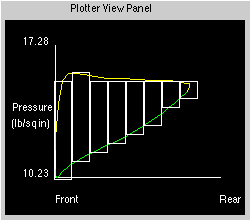 Figure 3 The total area between the curves is the sum of the individual areas; this value represents the lift force. Compare your value to the value given by FoilSim. Using the same graph, draw a straight line along the curves as shown in Figure 4. 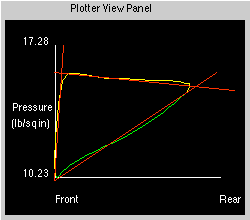 Figure 4 Find the slopes of each line and use them to find the respective equations. Use integration techniques to find the area of the enclosed region; this value represents the lift force. Compare your value to the value given by FoilSim and to your previous value. |
 |
 |
 |