Altitude and Flight Forces

Activity


If so instructed by your teacher, print out a worksheet page for these problems.


Activity:

Access the Forces on an Airplane site to read about the forces operating on an airplane. The points covered will be used in the next step of the activity.

Access FoilSim Download. Notice that the left side of the screen provides an Airfoil View Panel and an Airfoil Input Panel.
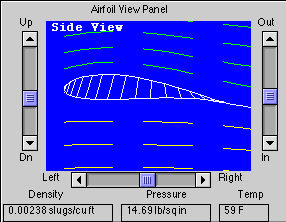
The Airfoil View Panel shows the changes in the density, pressure, and temperature as altitude conditions change. The formulas that allow these changes to occur are built into FoilSim.

  1. Compare and contrast the following forces on an airplane: weight, lift, thrust, and drag.
  2. Alter the altitude of the given airfoil. Enter values in the worksheet table. As the altitude changes, what happens to the density, pressure, temperature, and lift quantities?
  3. Compare the information obtained about the forces on an airplane with the table information. What is the implication of the changes in altitude on the forces affecting the flight of an airplane? Think this through carefully.

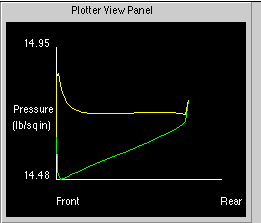
    On the right side of the FoilSim screen is the Plotter View Panel. Use this panel in FoilSim for the following question.

  4. As the altitude changes, what happens to the graphs seen in the Plotter View Panel window?
  5. What are the implications or importance of the green and yellow graphs seen in the Plotter View Panel window? Think carefully.


Please send any comments to:
Web Site Related: Dale Morris (Dale.J.Morris@grc.nasa.gov), Technology Related: Tom Benson(Tom Benson@lerc.nasa.gov)